
You don't hate data prep. You hate Tableau Prep.
- AI agent included
- No contract
- No card required
!There are errors in the flow. Unable to run the flow.
!Error
This flow requires more memory than is currently allocated to perform this action. Consider filtering your data or breaking the flow into smaller parts.
!Tableau Prep Builder
Tableau Prep Builder stopped running because an underlying process stopped unexpectedly. If the problem continues, try reinstalling the product.
System error: TableauException: There was a communication problem with Tableau Data Server. Internet communication error: Transferred a partial fileRun History
!Incremental refresh on step 'Output' failed
Cannot allocate 2,147,483,648 bytes of memory: The global memory limit was exceeded!Tableau Prep Builder
The product key is expired.
!Tableau Prep Builder
Maintenance has expired.
!Activation
Failed to activate the license because you have reached the limit of activations for this license.
Tableau Prep Conductor is part of Data Management and must be enabled to schedule your flows to run.
Tableau Prep Builder is not responding.
You can wait for it to respond, or force it to quit.
"Coco Alemana feels like it was built by someone who does this work. Native, quick, and it stays out of your way. I don't recommend many tools. This is one I'd hand to any data person on a Mac."
 John Humphrey VP Data, Mozilla
 Now picture the same week with Coco.
Coco finishes before Tableau opens.
The AI agent Tableau keeps behind Cloud+ is in the download.
Type what you want and get it, whether that's a count, a chart, or a new column derived from three others. It works on the file in front of you, not a copy of it somewhere else.
Clean it with a sentence.
Ask Coco to standardize inconsistent values, tidy up categories or filter the data. Review the changes as part of your workflow.
Find out why the number's wrong.
Ask Coco to look into unexpected values. It uses your change history for context and helps you fix the cause.
Sandboxed by default.
It can't delete or overwrite your source data. Its edits are marked in your change history, and ⌘Z undoes the last batch.
Getting Tableau's agent
- 1Upgrade to Cloud+ or the Tableau+ Bundle
- 2Talk to your account team
- 3Turn on Einstein generative AI in a Salesforce org
- 4Set up Data Cloud
Getting Coco's
- 1Download
- 2Open a file
- 3Type
Included in your subscription. No per-token charges. Your conversations are never stored or used to train models.
Click it, query it, or ask for it
Prep gives you a canvas of steps and a custom SQL box at the start. Coco runs clicks, SQL and the agent on the same dataset, in any order. Query, fix a column by hand, ask Coco to tidy the categories, query again. Every step is recorded and your source is never touched.
- Click Fix a column by hand
Inline, instant editing. Quickly change hundreds, or millions of problematic values by editing the table directly.
- SQL Query the same dataset
Switch between visual changes, and custom SQL statements that run directly against your changes.
- Ask Have Coco tidy the categories
Ask Coco to standardize inconsistent values, tidy up categories, or filter your data.
Tableau Prep and Coco, side by side
Clean, edit, query, and chart in one window
No export to a BI tool, CSVs in your downloads folder, or a stale copy of the truth. The dataset you cleaned is the dataset you chart. Same app, same data, seconds apart.
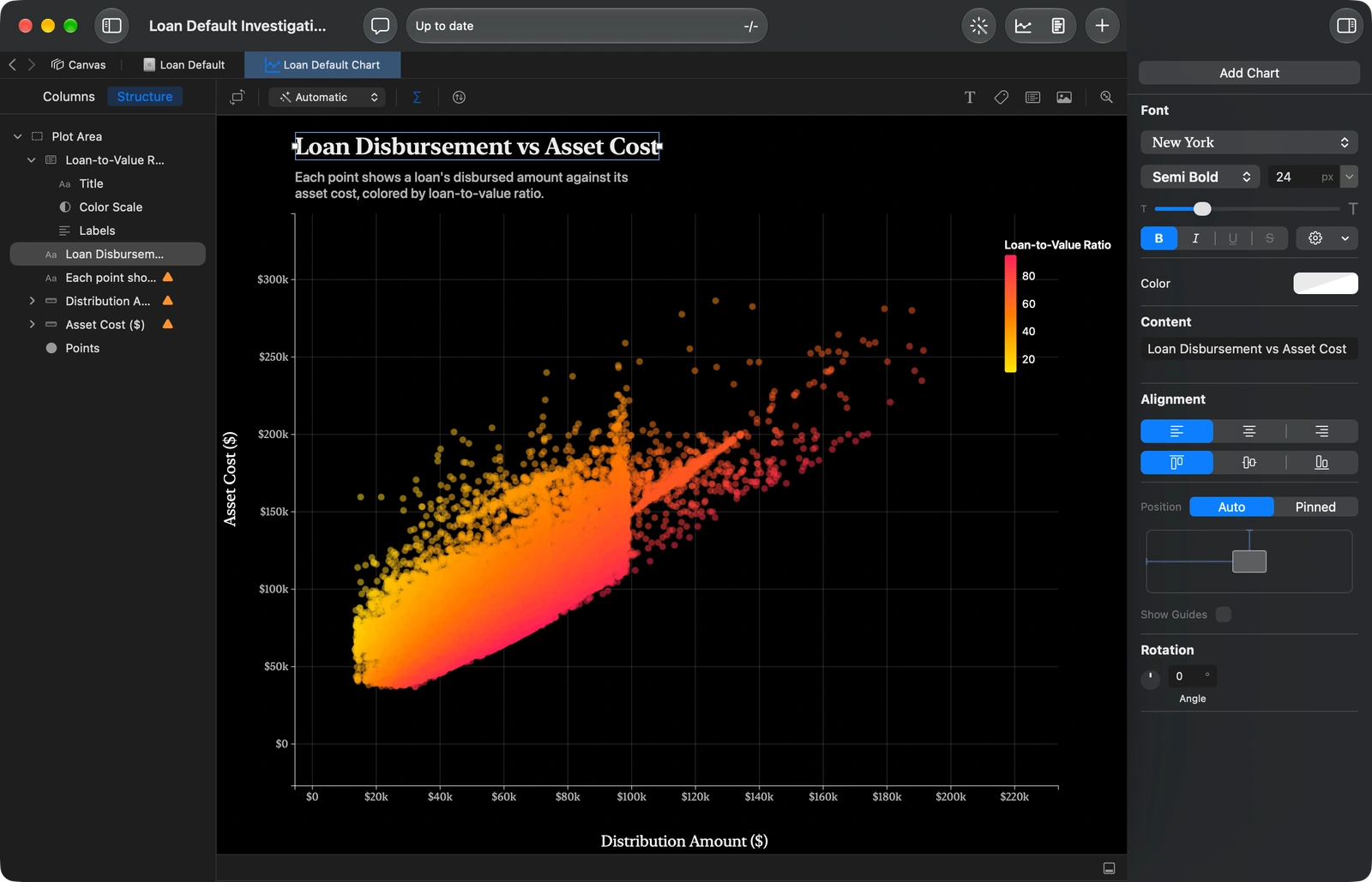
- Build charts with a drag and dropTurn columns into visualizations and refine them as you explore.
- Make them yoursCustomize colors, fonts, and layouts to make them yours.
- Same data, no handoffThe dataset you cleaned is the dataset you chart.
Coco Alemana was built by a data analyst who was fed up with the options.
You'll never talk to an account team. You'll talk to Ryan.
Frequently asked questions
Is Coco cheaper than Tableau?
It depends on what you're paying for. Coco is billed monthly, with the AI agent included. Tableau's Creator seat is billed yearly, and its Prep agent needs Cloud+. Try Coco free, with no card, and compare on your own data.
Do I need a Salesforce account, Data Cloud, or a call with sales to use the AI?
No, no, and no. Open a file and type. The only one you'll be talking to is Coco.
Where does my data go?
Your files stay on your disk. Coco Alemana is a native Mac app that processes everything locally, and your warehouse credentials never leave your machine. If you use the conversational feature, part of your data is sent to answer the question. We don't retain it and we don't train on it.
Is this Windows-compatible?
Not yet. Mac only right now, but Windows is coming soon. Join the Windows waitlist to get instant access when it launches.
Your Tableau renewal can wait. Try this on your data today.
- 1Download
- 2Open a file
- 3Type
- AI agent included
- No contract
- No card required